Process diagram in four steps
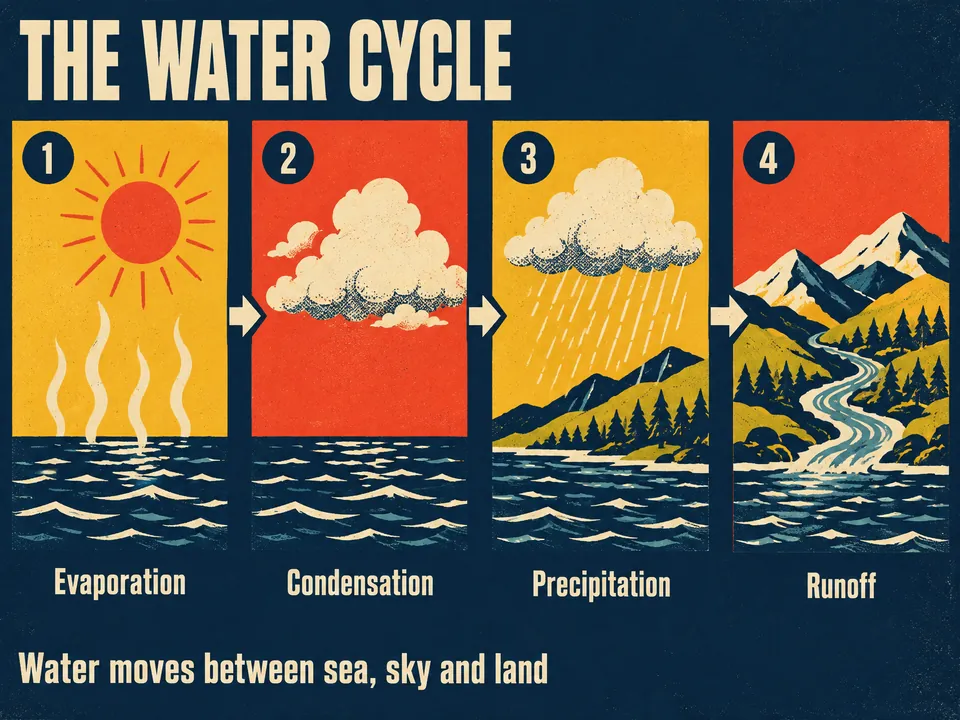
Name a process. Winda draws it in four panels from left to right, cause before effect. Each panel shows what changes in that step.
Free to start · No credit card needed
What you get
- Four panels
- One step in each, with an arrow from each panel to the next.
- What changes
- A thing that appears in one panel keeps its shape in the next, so the change is what you see.
- A line for each step, and a takeaway
- A short label under each panel and one sentence for the whole.
How it works
Say what it is about
Name a topic, or add a PDF, a lecture video, an article or your own notes. With files, the result is written from them.
Winda makes it
The template sets the form, so you do not write a prompt. You choose the model that does the work: Claude, GPT, Gemini and others.
Keep it and change it
The result is saved in your project beside your files and chats. Ask for a change in the chat, or make flashcards and a quiz from the same material.
Questions
No. It shows one path through a process in four illustrated steps. It has no decision boxes.
No. The result is a picture, not an editable canvas. To change it, say what to change in the chat, and Winda draws it again from the first one.
Not always. Winda decides the words before it draws and lists them in its reply, so you can check the picture against them. When a word comes out wrong, ask for the picture again.
More templates

Learn deeply. Create freely.
A learning space to read, chat and create.
Free to start · No credit card needed